How to Register a Domain Name for Your Business (and Secure It with SSL)
Step-by-step domain name registration for small businesses: how to choose a great name, which ending to pick, how to register and transfer with GreaterLink, and how to secure your site with SSL.
Your domain name is your address on the internet. It’s on your business cards, your email and your signs, and it is how customers find you online. Choosing and registering a domain name takes only a few minutes, and protecting it with an SSL certificate is just as easy. This guide walks you through both, step by step, with tips from the GreaterLink team.
What is a domain name?
A domain name is the easy-to-remember name people type to visit your website, like yourbusiness.com. You register it for a year or more at a time, and as long as you keep renewing it, it’s yours to use.
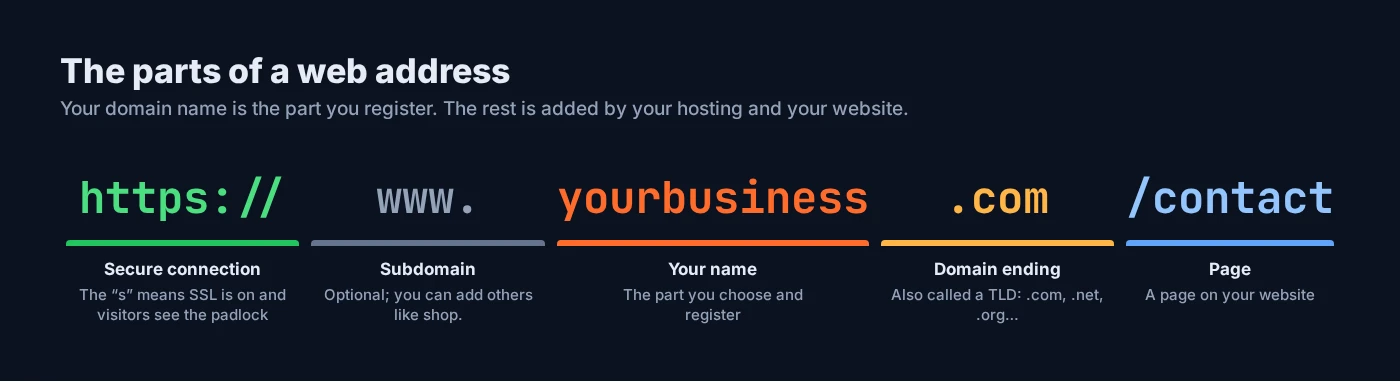
A domain name on its own doesn’t put a website online. You also need web hosting, which is where your website is stored. With GreaterLink you can keep your domain, hosting and email together in one account, with one bill and one support team. Every Shared Hosting plan even includes a free domain for the first year.
How to choose a great domain name
- Keep it short and simple. Shorter names are easier to remember, type and fit on a business card.
- Make it easy to spell. If you have to spell it out over the phone, customers will get it wrong. Avoid unusual spellings.
- Avoid hyphens and numbers. They are easy to forget and hard to say out loud (“is that the number 4 or the word four?”).
- Use your business name if you can. It builds your brand and helps people find you. If it’s taken, try adding your town or what you do, like
smithplumbingknoxville.com. - Check you aren’t using someone else’s brand. Avoid names that are close to another company’s trademark.
- Say it out loud. Make sure it sounds right and can’t be misread when the words run together.
- Register it quickly. Good names go fast. Once you’ve found one you like, don’t wait.

.com, .net or .org: which ending?
The ending of a domain name (like .com) is called a top-level domain, or TLD. Here are the most popular choices and their GreaterLink yearly prices:
| Ending | Best for | Price per year |
|---|---|---|
| .com | Almost any business. It’s the ending people know and type by default. | $20.00 |
| .net | A classic alternative when the .com is taken | $20.00 |
| .org | Organizations, charities and community groups | $16.20 |
| .biz | Businesses that want a clearly business-focused name | $22.80 |
| .info | Information and resource sites | $27.60 |
| .blog | Blogs and writers | $32.40 |
Prices were correct when this guide was published in September 2026, and GreaterLink domains renew at the same price. Taxes and ICANN fees may apply. See domain names for current prices.
Our advice: choose a .com if you can get one. If your favorite name is taken as a .com, try a slightly different name before settling for another ending.
How to register your domain with GreaterLink
- Search for your name. Go to GreaterLink Domains and type the name you want. You’ll see right away whether it’s available, along with suggestions if it isn’t.
- Add it to your cart. Pick the ending you want and click Add to Cart.
- Add hosting if you need it. If you’re building a website, add a hosting plan. With Shared Hosting, your domain is free for the first year.
- Check the domain settings. By default, new domains use GreaterLink’s nameservers so they work with our hosting straight away. Leave these as they are unless you plan to host your website somewhere else.
- Check out. Create your client account (or log in), enter your contact details and pay. Your domain is registered to you.
- Confirm your email address. Domain registries require the owner’s contact details to be accurate, so you may receive an email asking you to confirm your address. Click the link in it, because domains that aren’t confirmed can be suspended.
Keeping your domain safe
- Keep auto-renew on. If a domain expires, your website and email stop working, and after a while someone else could register it.
- Keep your contact email up to date. Renewal reminders and important notices go to the email address on your account. Use an address you check often, ideally one that isn’t at the same domain, so you still get messages if the domain has a problem.
- Keep your client account secure. Use a strong, unique password for your GreaterLink client area.
- Consider registering common variations. Some businesses also register the .net or a common misspelling of their name and point it to their main website.
Moving a domain you already own
If your domain is registered somewhere else, you can transfer it to GreaterLink and manage everything in one place. Here’s how transfers usually work:
- Unlock the domain at your current provider.
- Get the authorization code (also called an EPP or transfer code) from your current provider.
- Start the transfer at GreaterLink and enter the code.
- Approve the transfer if you receive a confirmation email.
Good to know: most domains can’t be transferred within 60 days of being registered or transferred, and for common endings like .com, .net and .org a transfer normally adds a year to your registration.
Securing your website with SSL
An SSL certificate encrypts the connection between your website and your visitors. It’s what puts the padlock in the browser and the “s” in https://. Without it, browsers such as Chrome label your site “Not secure”, which puts customers off, and Google has used HTTPS as a ranking signal since 2014.

Free SSL is included with GreaterLink hosting
Every GreaterLink hosting plan includes a free SSL certificate, so your website loads over HTTPS with the padlock. For most small business websites, that is all you need.
When a paid SSL certificate makes sense
- You use lots of subdomains (like
shop.yourbusiness.comandbook.yourbusiness.com). A wildcard certificate covers your domain and all its subdomains. - You want a larger protection warranty. Paid certificates come with a warranty from the certificate authority.
- You want your business identity checked. Organization Validation (OV) and Extended Validation (EV) certificates confirm that your business is real, not just that you control the domain.
| Certificate | Covers | Warranty | Price per year |
|---|---|---|---|
| Free SSL (with hosting) | Your website | None | Included |
| RapidSSL | Your main domain | $10,000 | $17.95 |
| RapidSSL Wildcard | Your domain and unlimited subdomains | $10,000 | $149.00 |
| GeoTrust QuickSSL Premium Wildcard | Your domain and unlimited subdomains | $500,000 | $279.00 |
See all options, including OV and EV certificates, on our SSL certificates page.
After SSL is installed
- Send everyone to the secure version. In cPanel, open Domains and turn on Force HTTPS Redirect for your domain, so visitors always land on
https://. - Update your website address. If you use WordPress, go to Settings → General and make sure both addresses start with
https://. - Check for the padlock on a few pages. If a page shows a warning, it usually has an image or file still loading over
http://; update that link tohttps://.
Frequently asked questions
How much does it cost to register a domain name?
At GreaterLink, .com and .net domains are $20.00 per year and .org domains are $16.20 per year, and they renew at the same price. Taxes and ICANN fees may apply. Every Shared Hosting plan includes a free domain for the first year. See domain names for current prices.
Can I get a free domain name?
Yes. GreaterLink Shared Hosting plans include a free domain for the first year.
Do I need to buy an SSL certificate?
Usually not. Every GreaterLink hosting plan includes a free SSL certificate, which is all most small business websites need. Consider a paid certificate if you need a wildcard certificate for subdomains, a larger warranty, or business validation.
Can I transfer my domain to GreaterLink?
Yes. Unlock your domain at your current provider, get the authorization (EPP) code, and start the transfer at GreaterLink. Most domains can’t be transferred within 60 days of being registered or transferred.
Can I use my domain for email?
Yes. With a GreaterLink hosting plan you can create professional email addresses like you@yourbusiness.com.
What happens if my domain expires?
Your website and email at that domain stop working. Keep auto-renew on and your contact email up to date so you never miss a renewal. If your domain has expired, contact GreaterLink as soon as possible at (800) 245-6301.
Ready to claim your name? Search for your domain now, or call a real person at GreaterLink any time on (800) 245-6301 and we’ll help you find the right one.
Need a hand with your website or hosting?
Talk to a real person at GreaterLink, any time, day or night.
More from the blog

Meet Uplink: How GreaterLink’s AI Upgrades Your Website and Fixes Your SEO
Meet Uplink, GreaterLink’s AI. See how it redesigns or updates your website by chat, handles your SEO automatically every time you publish, and how the free Uplink SEO Checkup shows you what to fix next.

Meet Uplink, the GreaterLink AI Website Builder: 3 Custom Designs in Minutes
Meet Uplink, our new AI Website Builder. It designs three custom homepages from a description of your business. Edit by chatting, keep or redesign your current site, and publish in one click.
Do I Need a Website If I Have a Facebook Page?
Facebook is a great start for a small business, but it isn’t a website. Here’s what each one does well, where Facebook falls short, and how to use both together.