Meet Uplink, the GreaterLink AI Website Builder: 3 Custom Designs in Minutes
Meet Uplink, our new AI Website Builder. It designs three custom homepages from a description of your business. Edit by chatting, keep or redesign your current site, and publish in one click.
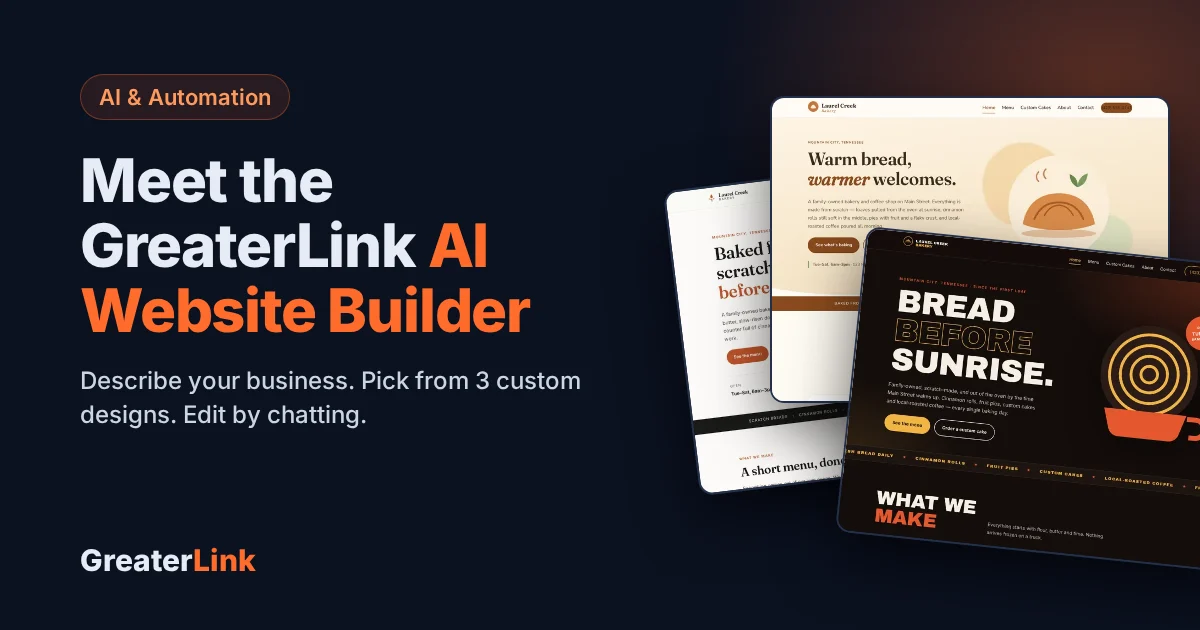
We just launched something new: Uplink, the GreaterLink AI Website Builder. You describe your business in plain English, Uplink designs three custom homepages for you to choose from, and then you change anything on your site simply by typing what you want. No templates to dig through, no drag-and-drop to learn, no tech skills needed.
It is live now at build.greaterlink.net, and GreaterLink hosting customers can open it straight from their account.
What the AI Website Builder does
Most website builders hand you a template and leave the rest to you. Ours works more like talking to a web designer:
- It designs from scratch for your business. A bakery, a law office and a landscaping company each get their own look, not the same template with different words.
- It gives you three choices. Every new site starts with three different homepage designs, side by side. You pick the one that feels like you.
- You edit by chatting. Type “make the header darker” or “add a gallery page” and watch it happen. Every change can be undone.
- It works on phones. Every page is built to look right on phones, tablets and desktops, with a proper mobile menu.
- Contact forms work out of the box. Messages go to your email and are saved in your dashboard.
Here are three designs the AI made for a sample bakery from one short description:
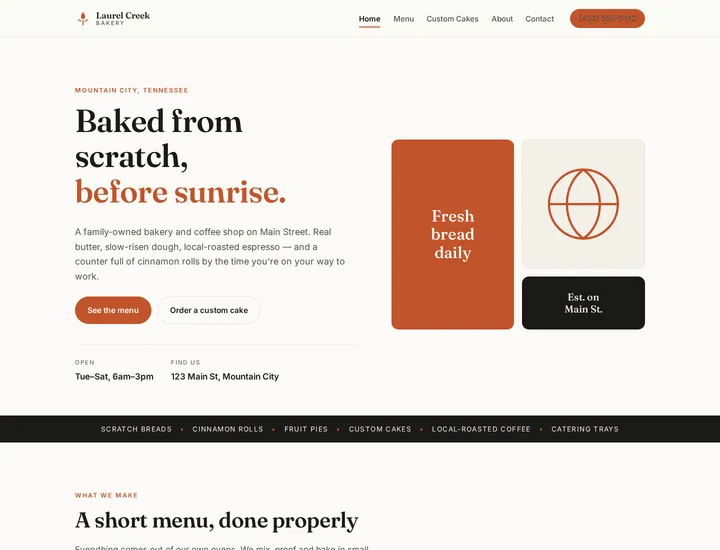
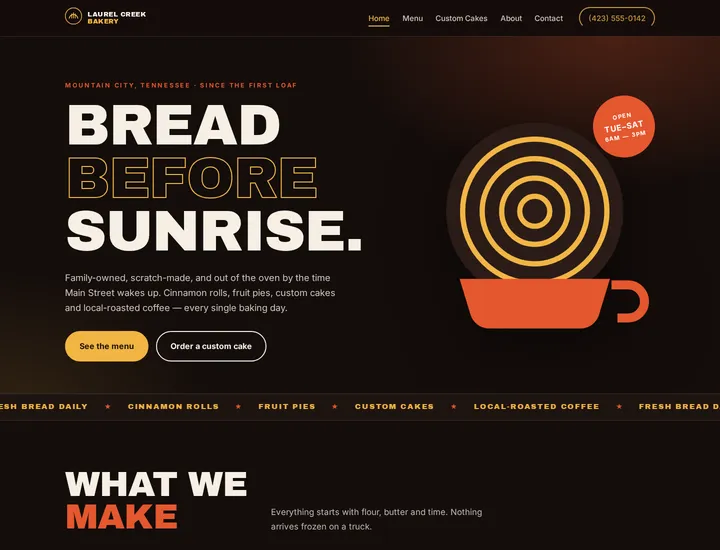
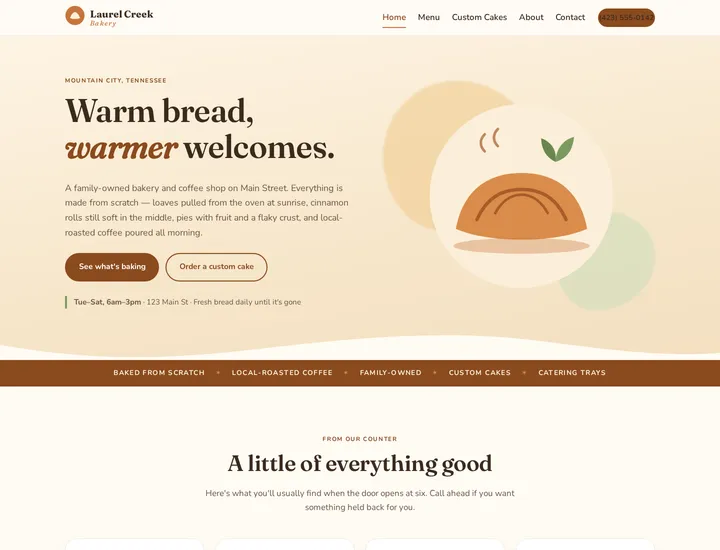
Three real designs from the builder: clean and modern, bold and striking, warm and inviting.
How it works, step by step
- Tell it about your business. Answer a few questions, or paste your current website address and let the AI read it and fill in your details, logo and photos for you.
- Pick a design. In about two to four minutes you get three homepage designs. Scroll through each one and choose your favorite.
- Let it build the rest. The AI builds your other pages (About, Services, Contact and so on) in the style you picked.
- Chat to change anything. Update your hours, swap a photo, add a page, rewrite a headline. Small changes take a few seconds.
- Publish. Put it online when you are happy with it.
Two ways to start: redesign or keep your current site
If you already have a website, you choose how to bring it in:
| Option | What happens | Best when |
|---|---|---|
| Redesign it | The AI reads your current site for your details and photos, then designs three brand-new homepages for you to choose from. | Your site looks dated and you want a fresh start. |
| Edit my current site | The AI copies your current site into the builder with the same look, wording and photos, so you can change it by chatting. | You like your site and just want an easy way to update it. |
You are not locked in either way. From the editor you can ask for three new designs at any time, and your current version stays saved in your history so you can go back.
What GreaterLink hosting customers get
If you already host with us, the builder is tied to your account:
- One click to open it. Log in to your GreaterLink account and click Open Uplink at the top of your dashboard. No second password.
- Your three homepage designs are free. So is copying your current site into the builder.
- Publish to your hosting in one click. The new site goes onto your existing domain. Your domain settings do not change.
- Nothing is lost. Any files the new site replaces are backed up first, and one button restores your old site.
What it costs
The AI’s work is paid for with credits. Bigger jobs use more credits than small ones. A complete new site uses roughly 230 credits, and a small edit usually uses 5 to 10. When you need more, choose an Uplink plan. Each one is hosting with Uplink built in:
| Plan | Price (hosting included) | AI credits each month | Websites |
|---|---|---|---|
| Starter | $29.95/month | 600 | 1 |
| Pro | $59.99/month | 1,800 | Up to 5 |
| Ultimate | $109.99/month | 4,500 | Up to 25 |
If you already host with us, your current hosting account is upgraded to the plan you pick. You keep the same account and domain, and you see the price before you pay. New to GreaterLink? Order an AI plan like any other hosting plan.
Other ways we can help you build
The AI Website Builder is one of three ways to get a website at GreaterLink:
- Uplink AI Website Builder. Describe it, pick a design, edit by chatting. Try it here.
- Sitejet Builder. Prefer to drag and drop yourself? Sitejet Builder is included with our Shared Hosting, with professional templates and an AI helper for your first draft.
- Have us build it. Want a person to handle everything? Our team designs and builds websites starting at $249. See website design.
New to all of this? Our step-by-step setup walks you through getting a web address and hosting, and a real person is always a phone call away.
Frequently asked questions
Do I need any technical skills to use the AI Website Builder?
No. If you can describe your business and type a message, you can build and update your website. There is no code and no editor to learn.
Is the website really custom, or is it a template?
It is designed for your business each time. You get three different homepage designs to choose from, and the rest of the site is built in the style you pick.
Can I keep my current website and just update it?
Yes. Choose “Edit my current site” and the AI copies your site into the builder with the same look, wording and photos. Then you change it by chatting.
What happens to my old site when I publish?
If you host with GreaterLink, any files the new site replaces are backed up first. You can restore your previous site with one button.
What are credits?
Credits pay for the AI’s work. Designing a whole site uses more credits than a small edit. Every account starts with 250 free credits, and monthly plans include more.
Can I get help from a person?
Yes. GreaterLink is based in Mountain City, Tennessee, and our team is here to help if you get stuck or would rather have us build the site for you.
Need a hand with your website or hosting?
Talk to a real person at GreaterLink, any time, day or night.
More from the blog
Meet Uplink: How GreaterLink’s AI Upgrades Your Website and Fixes Your SEO
Meet Uplink, GreaterLink’s AI. See how it redesigns or updates your website by chat, handles your SEO automatically every time you publish, and how the free Uplink SEO Checkup shows you what to fix next.
Do I Need a Website If I Have a Facebook Page?
Facebook is a great start for a small business, but it isn’t a website. Here’s what each one does well, where Facebook falls short, and how to use both together.
Best Website Builder for Beginners: How to Choose (2026 Guide)
How to choose the best website builder for beginners: what to look for, what free plans really include, website builder vs. WordPress, and costs to watch.